> For the complete documentation index, see [llms.txt](https://docs.movesdk.com/move-platform/llms.txt). Markdown versions of documentation pages are available by appending `.md` to page URLs; this page is available as [Markdown](https://docs.movesdk.com/move-platform/sdk/troubleshooting/ios.md).
# iOS
## Cocoapods
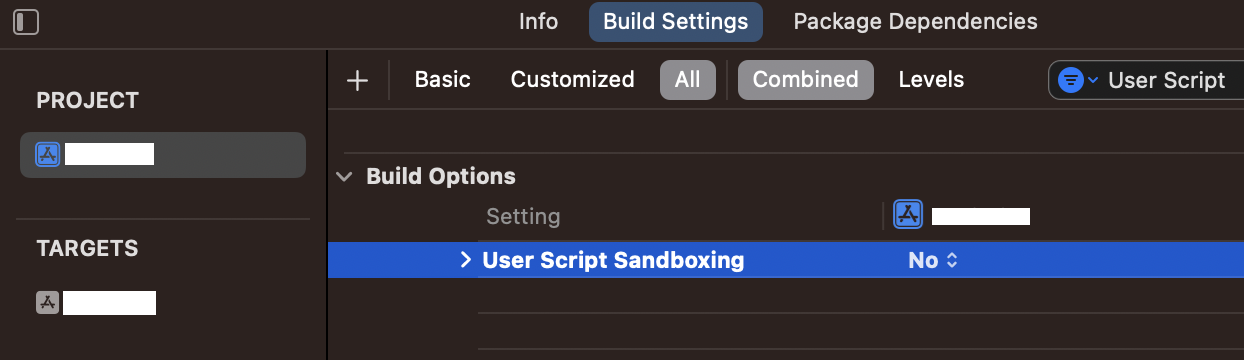
When setting up a new project with XCode 15.0 or above you need to make sure **User Script Sandboxing** is turned off.
Error:
```
Command PhaseScriptExecution failed with a nonzero exit code
```
Build log:
```
Run custom shell script '[CP] Embed Pods Frameworks'
```
Solution:
Set **User Script Sandboxing** to **No** in the project or target **Build Settings**.
Target Build Settings.
## Swift Package Manager
Package resolution fails with:
```
failed with: invalid archive returned from 'https://storage.googleapis.com/cdn.dolph.in/sdk/.../DolphinMoveSDK.xcframework.zip'
```
Solution:
```
# this is required
rm -rf ~/Library/Caches/org.swift.swiftpm
# this may be required
rm -rf ~/Library/org.swift.swiftpm
```
"File > Packages > Reset Package Caches" is not sufficient.
Neither is `swift package purge-cache`.
## Derived Data
Sometimes build issues can arise when updating to a new version, such as from 2.14 -> 2.15, and it is necessary to clear the build data. By default this is located at "*\~/Library/Developer/Derived Data*".
This may also be a necessary step in a build system, i.e:
#### Fastlane
This is often a common step. See:
```ruby
clean_build_artifacts
clear_derived_data
```